Introduction
Optics lenses play a critical role in laser systems by focusing and directing the laser beam. They ensure the system performs optimally, whether for cutting, engraving, or scanning. Since laser optics lenses are delicate, even minor damage can significantly degrade their performance, affecting overall system efficiency. The challenge is cleaning optics lenses properly without causing damage that could degrade laser performance. Contaminants like dust, smoke, and oils can accumulate on the lens, but improper cleaning can worsen the situation. In this article, you will learn how to clean optics lenses properly to extend their lifespan while maintaining laser system performance.
Main Problem and Challenge
One of the primary challenges laser system operators face is cleaning optics lenses without causing damage. While regular cleaning can help maintain clarity and performance, improper cleaning methods can result in scratches, streaks, or even cracks. The key challenge is to find the best cleaning practices to extend the lens lifespan while avoiding any harm to the lens or the laser system.
This article will delve into the best practices for cleaning optics lenses and offer practical solutions to prevent damage, ultimately enhancing the performance and lifespan of your laser system.
What Are Laser Optics Lenses?
Definition and Functionality
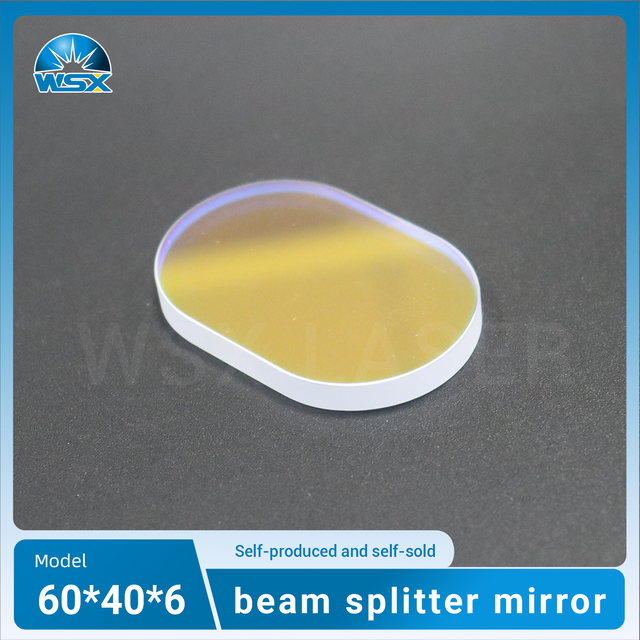
Laser optics lenses are specialized components in laser systems responsible for focusing and directing the laser beam. These lenses directly influence the laser's precision and cutting efficiency. A clean lens ensures optimal energy transmission and cutting accuracy.
The quality and cleanliness of optics lenses directly influence the performance of the laser system. A dirty or scratched lens can cause the laser to scatter, leading to inconsistent results and reduced efficiency. Proper maintenance, including cleaning, is essential to avoid these issues.
Types of Laser Optics Lenses
Lens Type | Function | Cleaning Frequency | Special Care |
Focusing Lenses | Focus the laser beam onto the material for precision cuts. | Frequent cleaning to maintain precision | Handle with care, avoid excessive pressure |
Collimating Lenses | Shape the laser beam into parallel light for uniformity. | Occasional cleaning when performance degrades | Clean gently to maintain parallel light |
Protective Lenses | Protect the internal optics from debris and heat. | Less frequent cleaning, check for dust | Ensure proper sealing and cleaning to avoid contaminants |
Why Do Laser Optics Lenses Need Cleaning?
Performance Degradation
Over time, optics lenses accumulate dust, smoke, and debris, which can scatter the laser, reducing its power and overall transmission. As the lens surface becomes contaminated, less laser energy reaches the material, reducing cutting power and performance. Regular cleaning removes these contaminants and ensures the laser maintains optimal power and precision during operations.
The laser system relies on clean optics lenses to maintain the sharpness and intensity of the laser beam. Any contaminants on the lens can degrade the system’s ability to cut or engrave accurately, leading to subpar results.
Material Sensitivity
Certain materials, such as metal vapors, smoke, or residue generated during laser cutting, can leave permanent deposits on optics lenses. Over time, these residues can burn into the lens, creating permanent damage that reduces the lens’s effectiveness. Regular cleaning helps avoid this issue and ensures the lens maintains optimal performance.
Visual Signs That Lenses Need Cleaning
You may notice several signs indicating that your optics lenses need cleaning:
● Inconsistent laser beam quality: A dirty lens scatters the beam, leading to weak or inconsistent cutting power.
● Reduced cutting precision or performance: As contaminants build up, the lens’s ability to focus the laser beam diminishes, resulting in lower precision.
● Visible marks, smudges, or dirt on the lens surface: These are clear indicators that the lens needs cleaning to restore its efficiency and performance.
How to Clean Laser Optics Lenses Properly
Initial Dust Removal
The first step in cleaning optics lenses is to remove any loose particles that could scratch the surface during cleaning. Compressed air is one of the most effective tools for this task. It ensures that dust, dirt, and debris are blown away from the surface without causing any damage. Always use clean, oil-free air to avoid introducing contaminants, such as oils, which can further harm the lens.
Why Use Compressed Air?
Using compressed air ensures that loose particles are removed quickly and efficiently, minimizing the risk of scratching or damaging the lens. Unlike cloths or wipes, air removes dust without coming into direct contact with the lens, which is especially important for delicate optics lenses.
Wet Cleaning Method
After removing dust, some stains or smudges may remain on the lens. For these more persistent marks, a wet cleaning method is required to restore clarity.
Isopropyl Alcohol or Lens Cleaner
For stubborn stains or smudges, apply isopropyl alcohol or a specialized lens cleaner to a soft, lint-free cloth or lens wipe. Always clean the lens gently in a circular motion, starting from the center of the lens and working outward. This method helps prevent streaks and ensures that the cleaning process is even across the lens.
Why Is Isopropyl Alcohol Recommended?
Isopropyl alcohol is a widely recommended solution for cleaning optics lenses due to its ability to dissolve oils and remove dirt without leaving residue. It evaporates quickly, preventing moisture damage to the lens.
Drying and Finishing
After cleaning the optics lenses, it is essential to dry them properly to prevent streaks or water spots from forming. Proper drying is crucial to ensuring that the lens remains clear and functional.
Use Clean, Dry Wipes
Use clean, dry wipes or a lens tissue that is specifically designed for optics to gently blot the lens and remove any moisture. For delicate lenses, professional-grade tools designed for cleaning optics lenses may be necessary to prevent scratching during the drying process.
Why Proper Drying Is Important
If the lens isn’t dried correctly, leftover moisture can cause streaks or spots, which can reduce the lens’s effectiveness and compromise its longevity. Always ensure that the drying method is gentle to avoid introducing new damage.
Techniques for Specific Lens Types
Focusing Lenses
Focusing lenses are critical for laser systems as they directly affect the accuracy of the laser beam. These lenses require extra care during cleaning to maintain precision.
● Use the circular motion technique to clean the lens.
● Avoid applying excessive pressure when wiping, as this could scratch or distort the lens surface.
Protective Lenses
Protective lenses often require less frequent cleaning but should still be checked regularly. These lenses are designed to shield other critical components from contaminants and heat. Cleaning these lenses follows similar methods to focusing lenses, but with less frequency.
● Regular cleaning is essential if the protective lens is exposed to dust or debris.
● For these lenses, you may want to check them less frequently unless they are heavily exposed to laser operation residue.
Preventative Measures to Avoid Lens Damage
To extend the lifespan of optics lenses, it’s essential to establish a regular maintenance schedule. Frequent inspections help detect small issues before they become major problems. Cleaning your lenses regularly ensures that contaminants do not build up and cause permanent damage.
Proper Storage and Handling
Proper storage and handling are vital to prevent unnecessary wear and tear on your optics lenses.
Avoid Touching
Always handle optics lenses with gloves. Finger oils can leave residue on the lens surface, which could affect its clarity and cause buildup over time.
Use Proper Storage Containers
Store optics lenses in a clean, dust-free container when not in use. This protects them from accidental contamination or physical damage.
Environmental Control
Control Dust and Air Quality
Maintaining a clean workspace with filtered air helps prevent dust and other particles from settling on optics lenses. Use air purifiers or filtration systems in the laser cutting area to keep the environment clean and free from contaminants.
Humidity Control
High humidity can lead to condensation forming on optics lenses, causing moisture damage and affecting performance. Keeping the workspace dry and stable is essential to maintaining the longevity of your lenses.

Troubleshooting Common Issues with Laser Optics Lenses
Scratches and Scuffs
If scratches occur, they are often the result of improper cleaning materials or techniques. It’s crucial to use soft, lint-free materials and avoid abrasive cloths or wipes to prevent damaging the lens.
Stains or Smudges
Stubborn stains or smudges may require specialized lens cleaners designed for laser optics lenses. If isopropyl alcohol or water does not suffice, use a professional-grade cleaner to remove the stains without damaging the lens surface.
Burnt Lenses
Burnt lenses are often caused by improper cleaning or exposure to excessive laser power. Ensure your optics lenses are cleaned with appropriate materials and have the right coatings to prevent overheating or laser burn.
Conclusion
Regular cleaning is essential to maintain laser optics lenses and ensure the optimal performance of your laser system. Using compressed air, proper cleaning solutions, and high-quality wipes will help keep the lenses clear and functional. Invest in high-quality optics lenses and follow a regular maintenance schedule for optimal performance. Use professional cleaning tools and techniques to ensure the longevity of your laser system and avoid costly damage. Shenzhen Worthing Technology Co., Ltd. offers top-tier protective lenses and cleaning solutions, ensuring superior performance and durability for your laser cutting equipment.
FAQ
Q: Why is it important to clean optics lenses regularly?
A: Regular cleaning of optics lenses helps maintain laser performance and ensures optimal beam focus, extending the system's lifespan.
Q: How do I clean optics lenses properly?
A: Use compressed air to remove dust, followed by isopropyl alcohol and a lint-free cloth for stubborn smudges on optics lenses.
Q: What are the best practices for cleaning optics lenses?
A: Always use soft, lint-free materials, and avoid harsh chemicals to prevent damage to optics lenses during cleaning.
Q: Can I use regular cleaning solutions for optics lenses?
A: No, specialized lens cleaners or isopropyl alcohol should be used to avoid damaging the surface of optics lenses.
Q: How can I prevent damage to optics lenses during cleaning?
A: Handle optics lenses gently, use professional cleaning tools, and avoid excessive pressure to maintain their clarity and function.